



Spring Boot + GraphQL + MongoDB Integration


In this blog, we'll learn how Spring Boot and GraphQL work together seamlessly. Their APIs are simple and friendly, making it easy and enjoyable for developers to create them. Due to its flexibility and rapid configuration, Spring Boot has become a popular choice for backend deployments.
GraphQL contains a smart query language and a runtime crafted by Facebook. This innovation fixes the problems with regular REST APIs. Thanks to GraphQL, we can get the exact data we need without getting too much or too little. The goal is efficiency and delivering only what's necessary.
What is GraphQL?
GraphQL is a query language that specifies how API clients should request information. A broad definition of GraphQL is a syntax that allows developers to request specific data and receive it from multiple sources. The server returns data using the same structure defined by the client.
How does GraphQL work?
With GraphQL's open-source capabilities for read processes, data mutation, and monitoring, developers can make real-time updates to data. A variety of coding languages have been developed to work with GraphQL servers, including JavaScript, Python, Ruby, C#, Go, and PHP. Data stored within APIs can be accessed comprehensively by developers using GraphQL. APIs will be able to receive only relevant data, as well as be designed in a way that will make them easier to scale and adapt over time.
In order to build APIs using GraphQL, a server must host the API and a client must connect to the application endpoint. Below is a list of the fundamental components of GraphQL APIs
i) Schema.: A type system used to define all the capabilities and functions of a server implementation.
ii) Query. A request for an output. Queries can contain nested fields, arrays, and arguments, and are defined with a keyword.
iii) Resolver. Functions that specify how an API can access data within a given field. A GraphQL server would not be able to handle queries without this.
iv) Mutation: Data manipulation is performed using mutations in GraphQL. Mutations take on the role of guardians of change, unlike queries, which read data. Within the GraphQL universe, they provide a controlled and elegant way to insert and update data.
v) Scalar: Scalars are fundamental data types in GraphQL that represent a single value. Within the GraphQL schema, scalars define the shape and structure of the data. Unlike object types, which can have more than one field, scalars can only hold one value.
Configuring Spring Boot with GraphQL
Let's make a simple Candidate API app with GraphQL and Spring Boot.
Maven Dependencies
Configure graphql in our application by adding the following to pom.xml
<project
        xmlns="http://maven.apache.org/POM/4.0.0"
        xmlns:xsi="http://www.w3.org/2001/XMLSchema-instance"
        xsi:schemaLocation="http://maven.apache.org/POM/4.0.0 http://maven.apache.org/xsd/maven-4.0.0.xsd">
        <modelVersion>4.0.0</modelVersion>
        <parent>
                <groupId>org.springframework.boot</groupId>
                <artifactId>spring-boot-starter-parent</artifactId>
                <version>3.2.1</version>
                <relativePath/> <!-- lookup parent from repository -->
        </parent>
        <groupId>com.example</groupId>
        <artifactId>GraphQl-Spring-Boot-Application</artifactId>
        <version>0.0.1-SNAPSHOT</version>
        <name>GraphQl-Spring-Boot-Application</name>
        <description>GraphQl-Spring-Boot-Example-Application</description>
        <properties>
                <java.version>17</java.version>
        </properties>
        <dependencies>
                <dependency>
                        <groupId>org.springframework.boot</groupId>
                        <artifactId>spring-boot-starter-data-mongodb</artifactId>
                </dependency>
                <dependency>
                        <groupId>org.springframework.boot</groupId>
                        <artifactId>spring-boot-starter-graphql</artifactId>
                </dependency>
                <dependency>
                        <groupId>org.springframework.boot</groupId>
                        <artifactId>spring-boot-starter-web</artifactId>
                </dependency>
                <dependency>
                        <groupId>org.springframework.boot</groupId>
                        <artifactId>spring-boot-devtools</artifactId>
                        <scope>runtime</scope>
                        <optional>true</optional>
                </dependency>
                <dependency>
                        <groupId>org.projectlombok</groupId>
                        <artifactId>lombok</artifactId>
                        <optional>true</optional>
                </dependency>
                <dependency>
                        <groupId>org.springframework.boot</groupId>
                        <artifactId>spring-boot-starter-test</artifactId>
                        <scope>test</scope>
                </dependency>
                <dependency>
                        <groupId>org.springframework</groupId>
                        <artifactId>spring-webflux</artifactId>
                        <scope>test</scope>
                </dependency>
                <dependency>
                <groupId>javax.annotation</groupId>
                <artifactId>javax.annotation-api</artifactId>
                <version>1.3.2</version>
        </dependency>
                <dependency>
                        <groupId>org.springframework.graphql</groupId>
                        <artifactId>spring-graphql-test</artifactId>
                        <scope>test</scope>
                </dependency>
        </dependencies>
        <build>
                <plugins>
                        <plugin>
                                <groupId>org.springframework.boot</groupId>
                                <artifactId>spring-boot-maven-plugin</artifactId>
                                <configuration>
                                       <excludes>
                                              <exclude>
                                                   <groupId>org.projectlombok</groupId>
                                                    <artifactId>lombok</artifactId>
                                              </exclude>
                                       </excludes>
                                </configuration>
                        </plugin>
                </plugins>
        </build>
</project>
Creating GraphQL Schema
Schema files typically have the extension ".graphqls" or ".gqls". By default, GraphQL starter looks for schema files in src/main/resources/graphql.By adding spring.graphql.schema.locations to application.properties, we can customize the schema location.
spring.graphql.schema.locations=/graphql-schema
We will have two types of objects in our application: User and Course. Add the following code in your schema.graphqls file.
type Query {
    users: [User]
    user(id: String): User
}

type User {
    id: String
    name: String
    age: Int
    createdAt: String
    colleagues: [User]
    courses: [Course]
}

type Course {
   id: String
   title: String
   description : String
}
Creating Model
The GraphQL schema maps each object type to a Java object. Due to this, we will have two Java objects: Candidate and Father, which will have fields similar to those defined in the schema.
User Entity
package com.application.graphql.entity;

import lombok.*;
import org.bson.types.ObjectId;
import org.springframework.data.mongodb.core.mapping.Document;

import java.util.Date;
import java.util.List;

@Data
@AllArgsConstructor
@NoArgsConstructor
@Builder
@Document(collection = "users")
public class User {

   private ObjectId id;

   private String name;
   private Integer age;
   private List<String> courseIdsofcolleague;
   private Date createdAt;
   private List<String> courseIds;
}
Course Entity
package com.application.graphql.entity;

import lombok.AllArgsConstructor;
import lombok.Builder;
import lombok.Data;
import lombok.NoArgsConstructor;
import org.bson.types.ObjectId;
import org.springframework.data.mongodb.core.mapping.Document;

@Data
@AllArgsConstructor
@NoArgsConstructor
@Builder
@Document(collection = "courses")
public class Course {
   private ObjectId id;
   private String title;
   private String description;
   private String instructorId;
}
Creating Repository
For query resolution, let's create a UserRepository and CourseRepository that connects to our backend database.
User Repository
package com.application.graphql.repository;

import org.bson.types.ObjectId;
import org.springframework.data.mongodb.repository.MongoRepository;

import com.application.graphql.entity.User;

import java.util.List;

public interface UserRepository extends MongoRepository<User, ObjectId>{

   List<User> findByIdIn(List<String> ids);
}
Course Repository
package com.application.graphql.repository;

import org.bson.types.ObjectId;
import org.springframework.data.mongodb.repository.MongoRepository;

import com.application.graphql.entity.Course;

import java.util.List;

public interface CourseRepository extends MongoRepository<Course, ObjectId> {

   List<Course> findByIdIn(List<String> ids);
}
Creating Service
In addition to repositories, the app needs a business logic layer:
So let's add two interfaces to the services folder:
- UserService
- CourseService
Create a folder called "implementation" to hold all the classes with business logic, and implement services interfaces:
Currently, UserServiceImplmentation and CourseServiceImplementation implements CourseService and UserService interfaces.
File: UserService.java
package com.application.graphql.service;

import java.util.List;
import java.util.Optional;

import org.bson.types.ObjectId;

import com.application.graphql.entity.User;

public interface UserService {

   List<User> findAllUsers();
   Optional<User> findOneById(ObjectId id);
   List<User> findByIdIn(List<String>ids);
}
File: CourseService.java
package com.application.graphql.service;

import java.util.List;

import com.application.graphql.entity.Course;

public interface CourseService {

   List<Course> findAllUserCourses(List<String> userId);
}
User Service Implementation
package com.application.graphql.service.implmentation;

import org.bson.types.ObjectId;
import org.springframework.beans.factory.annotation.Autowired;
import org.springframework.stereotype.Service;

import com.application.graphql.entity.User;
import com.application.graphql.repository.UserRepository;
import com.application.graphql.service.UserService;

import java.util.ArrayList;
import java.util.List;
import java.util.Optional;

@Service
public class UserServiceImplementation implements UserService{

   private final UserRepository userRepository;

   @Autowired
   UserServiceImplementation(UserRepository userRepository){
       this.userRepository = userRepository;
   }

   @Override
   public List<User> findAllUsers() {
       return (ArrayList) userRepository.findAll();
   }

   @Override
   public Optional<User> findOneById(ObjectId id) {
       return userRepository.findById(id);
   }

   @Override
   public List<User> findByIdIn(List<String> ids) {
       return userRepository.findByIdIn(ids);
   }
}
Course Service Implementation
package com.application.graphql.service.implmentation;

import org.springframework.beans.factory.annotation.Autowired;
import org.springframework.stereotype.Service;

import com.application.graphql.repository.CourseRepository;
import com.application.graphql.service.CourseService;
import com.application.graphql.entity.Course;

import java.util.List;

@Service
public class CourseServiceImplementation implements CourseService {

   private final CourseRepository courseRepository;

   @Autowired
   public CourseServiceImplementation(CourseRepository courseRepository) {
       this.courseRepository = courseRepository;
   }


   @Override
   public List<Course>findAllUserCourses(List<String> ids) {
       return courseRepository.findByIdIn(ids);
   }
}
Creating Test Data
There will be 4 users, and each user will have a course. By doing so, we can see how easy it is to fetch needed information with GrapQL. In order to generate data, we need to create a folder called dataLoader and add the code below to it
package com.application.graphql.dataloader;

import org.springframework.beans.factory.annotation.Autowired;
import org.springframework.stereotype.Component;
import com.application.graphql.entity.*;
import com.application.graphql.repository.*;
import javax.annotation.PostConstruct;
import java.util.*;


@Component
public class DataLoader {
   private final UserRepository userRepository;
   private final CourseRepository courseRepository;

   @Autowired
   DataLoader(UserRepository userRepository, CourseRepository courseRepository){
       this.userRepository = userRepository;
       this.courseRepository = courseRepository;
   }

  @PostConstruct
  private void generateData(){
   List<User> users = new ArrayList<>();
   users.add(
       User.builder().name("Muthu")
                            .createdAt(new Date())
                            .age(22)
                            .courseIds(new ArrayList<>()).courseIdsofcolleague(new ArrayList<>()).build());

    users.add(
         User.builder().name("Annamalai")
                              .createdAt(new Date())
                              .age(26)
                              .courseIds(new ArrayList<>()).courseIdsofcolleague(new ArrayList<>()).build());

   users.add(
          User.builder().name("Venkatachalam")
                               .createdAt(new Date())
                               .age(45)
                               .courseIds(new ArrayList<>()).courseIdsofcolleague(new ArrayList<>()).build());

  users.add(
          User.builder().name("Nanda")
                                .createdAt(new Date())
                                .age(20)
                                .courseIds(new ArrayList<>()).courseIdsofcolleague(new ArrayList<>()).build());

  users = userRepository.saveAll(users);

   List<Course> courses = new ArrayList<>();
   courses.add(
        Course.builder().title("Introduction to GraphQl")
                                .description("In this course you would get to know every concept in GraphQl")
                                 .instructorId(users.get(0).getId().toString()).build());

   courses.add(
        Course.builder().title("Introduction to Spring Boot")
                                .description("In this course you would get to know every concept in Spring Boot")
                                .instructorId(users.get(1).getId().toString()).build());

   courses.add(
        Course.builder().title("Introduction to Java")
                                 .description("In this course you would get to know every concept in Java")
                                 .instructorId(users.get(3).getId().toString()).build());

   courses = courseRepository.saveAll(courses);

   users.get(0).setCourseIds(Arrays.asList(courses.get(0).getId().toHexString(), courses.get(1).getId().toHexString()));
   users.get(1).setCourseIds(Collections.singletonList(courses.get(2).getId().toHexString()));
   users.get(3).setCourseIds(Collections.singletonList(courses.get(0).getId().toHexString()));

   userRepository.saveAll(users);

   List<String> mycolleagueIds = new ArrayList<>();
   for (int i = 1; i < users.size(); i++) {
       mycolleagueIds.add(users.get(i).getId().toHexString());
   }
   users.get(0).setCourseIdsofcolleague(mycolleagueIds);
   userRepository.save(users.get(0));
 }

}
Creating Data Fetcher
Data fetchers are specialized components designed to retrieve specific types of information in a system.
These components likely contain the necessary logic to interact with data sources, such as a database, to fulfill requests for user-related information and courses, contributing to a modular and organized data retrieval system in the application.
We will the following have 3 data fetchers:
- UserDataFetcher — used when all users or their colleagues are requested;
- GetAllUsersDataFetcher — used for fetching data for a single user based on their ID;
- CoursesDataFetcher — used to fetch courses for each user;
UserDataFetcher
package com.application.graphql.datafetcher;

import graphql.schema.*;
import org.bson.types.ObjectId;
import org.springframework.beans.factory.annotation.Autowired;
import org.springframework.stereotype.Component;

import com.application.graphql.entity.User;
import com.application.graphql.service.UserService;

import java.util.Map;
import java.util.Optional;

@Component
public class UserDataFetcher implements DataFetcher<User> {

   private final UserService userService;

   @Autowired
   UserDataFetcher(UserService userService){
       this.userService = userService;
   }

   @Override
   public User get(DataFetchingEnvironment env) {
       Map args = env.getArguments();
       Optional<User> user = userService.findOneById(new ObjectId(String.valueOf(args.get("id"))));
       return null;
   }
}
GetAllUsersDataFetcher
package com.application.graphql.datafetcher;

import graphql.schema.DataFetcher;
import graphql.schema.DataFetchingEnvironment;
import org.springframework.beans.factory.annotation.Autowired;
import org.springframework.stereotype.Component;

import com.application.graphql.entity.User;
import com.application.graphql.service.UserService;

import java.util.ArrayList;
import java.util.List;

@Component
public class GetAllUsersDataFetcher implements DataFetcher<List<User>> {

   private final UserService userService;

   @Autowired
   GetAllUsersDataFetcher(UserService userService){
       this.userService = userService;
   }

   @Override
   public List<User> get(DataFetchingEnvironment env) {
       User user =  env.getSource();
       List<User> colleagues = new ArrayList<>();
       if(user !=null){
           colleagues = userService.findByIdIn(user.getCourseIdsofcolleague());
       }else {
               colleagues = userService.findAllUsers();
       }
       return colleagues;
   }
}
CoursesDataFetcher
package com.application.graphql.datafetcher;

import org.springframework.beans.factory.annotation.Autowired;

import org.springframework.stereotype.Component;

import com.application.graphql.entity.Course;
import com.application.graphql.entity.User;
import com.application.graphql.service.CourseService;

import graphql.schema.DataFetcher;
import graphql.schema.DataFetchingEnvironment;

import java.util.ArrayList;
import java.util.List;

@Component
public class CoursesDataFetcher implements DataFetcher<List<Course>>{

   private final CourseService courseService;

   @Autowired
   CoursesDataFetcher(CourseService courseService){
       this.courseService = courseService;
   }

   @Override
   public List<Course> get(DataFetchingEnvironment env) {
       User user = env.getSource();
       List<String> courseIds = new ArrayList<>();
       if(user!=null){
           courseIds = user.getCourseIds();
       }
       List<Course> courses = courseService.findAllUserCourses(courseIds);
       return courses;
   }
}
Creating GraphQl Utility
Next, we'll add our custom GraphQlUtility. To execute queries, we need an instance of GraphQl. Let's create a folder called graphql_utilities. In this folder, we will have a single class called GraphQlUtility, which will build the graphQl object, which we will use in our controller:
package com.application.graphql.graphQlUtility;

import graphql.GraphQL;
import graphql.schema.DataFetcher;
import graphql.schema.GraphQLSchema;
import graphql.schema.idl.RuntimeWiring;
import graphql.schema.idl.SchemaGenerator;
import graphql.schema.idl.SchemaParser;
import graphql.schema.idl.TypeDefinitionRegistry;
import org.springframework.beans.factory.annotation.Autowired;
import org.springframework.beans.factory.annotation.Value;
import org.springframework.core.io.ClassPathResource;
import org.springframework.core.io.Resource;
import org.springframework.stereotype.Component;

import com.application.graphql.datafetcher.CoursesDataFetcher;
import com.application.graphql.datafetcher.GetAllUsersDataFetcher;
import com.application.graphql.datafetcher.UserDataFetcher;

import javax.annotation.PostConstruct;
import java.io.File;
import java.io.IOException;
import java.io.InputStream;

import static graphql.GraphQL.newGraphQL;
import static graphql.schema.idl.RuntimeWiring.newRuntimeWiring;

@Component
public class GraphQlUtility {

   @Value("classpath:graphql/schemas.graphqls")
   private Resource schemaResource;
   private GraphQL graphQL;
   private GetAllUsersDataFetcher getAllUsersDataFetcher;
   private UserDataFetcher userDataFetcher;
   private CoursesDataFetcher coursesDataFetcher;

   @Autowired
   GraphQlUtility(GetAllUsersDataFetcher getAllUsersDataFetcher, UserDataFetcher userDataFetcher,
                   CoursesDataFetcher coursesDataFetcher) throws IOException {
       this.getAllUsersDataFetcher = getAllUsersDataFetcher;
       this.userDataFetcher = userDataFetcher;
       this.coursesDataFetcher = coursesDataFetcher;
   }

   @PostConstruct
   public GraphQL createGraphQlObject() throws IOException {
       File schemas = schemaResource.getFile();
       TypeDefinitionRegistry typeRegistry = new SchemaParser().parse(schemas);
       RuntimeWiring wiring = buildRuntimeWiring();
       GraphQLSchema schema = new SchemaGenerator().makeExecutableSchema(typeRegistry, wiring);
       return  newGraphQL(schema).build();
   }

   public RuntimeWiring buildRuntimeWiring(){
       return newRuntimeWiring()
               .type("Query", typeWiring -> typeWiring
                   .dataFetcher("users", getAllUsersDataFetcher)
                   .dataFetcher("user", userDataFetcher))
               .type("User", typeWiring -> typeWiring
                   .dataFetcher("courses", coursesDataFetcher)
                   .dataFetcher("colleagues", getAllUsersDataFetcher))
               .build();
   }
}
Creating Controller
Let's add the following code to the controller as a final step
package com.application.graphql.controller;

import graphql.ExecutionResult;
import graphql.GraphQL;
import org.springframework.beans.factory.annotation.Autowired;
import org.springframework.http.ResponseEntity;
import org.springframework.web.bind.annotation.PostMapping;
import org.springframework.web.bind.annotation.RequestBody;
import org.springframework.web.bind.annotation.RestController;

import com.application.graphql.graphQlUtility.GraphQlUtility;

import java.io.IOException;

@RestController
public class Controller {

   private final GraphQL graphQL;
   private final GraphQlUtility graphQlUtility;

   @Autowired
   public Controller(GraphQlUtility graphQlUtility) throws IOException {
       this.graphQlUtility = graphQlUtility;
       this.graphQL = graphQlUtility.createGraphQlObject();
   }

   public static class GraphQLRequest {
       private String query;

       public GraphQLRequest() {
           // Default constructor required by Jackson
       }

       public GraphQLRequest(String query) {
           this.query = query;
       }

       public String getQuery() {
           return query;
       }

       public void setQuery(String query) {
           this.query = query;
       }
   }

   @PostMapping(value = "/query")
   public ResponseEntity query(@RequestBody GraphQLRequest graphQLRequest) {
       ExecutionResult result = graphQL.execute(graphQLRequest.getQuery());
       System.out.println("errors: " + result.getErrors());
       return ResponseEntity.ok(result.getData());
   }
}
Configuring the Database
Add the following code to your application.yml file to connect to the database. You can change the name and port as you wish
server:
 port: 9000
spring:
data:
 mongodb:
  database: graphql-spring-boot
  host: localhost
  port: 27017
Demo ScreenShots
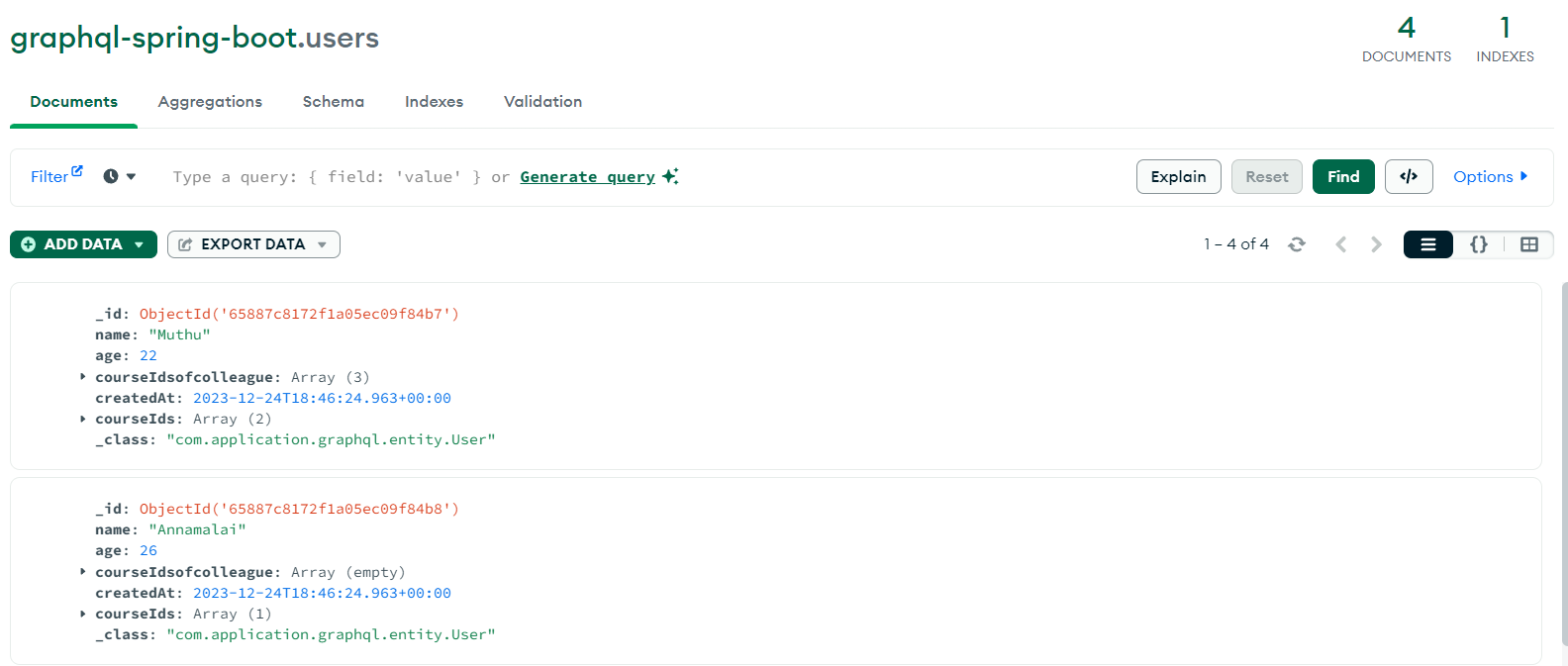
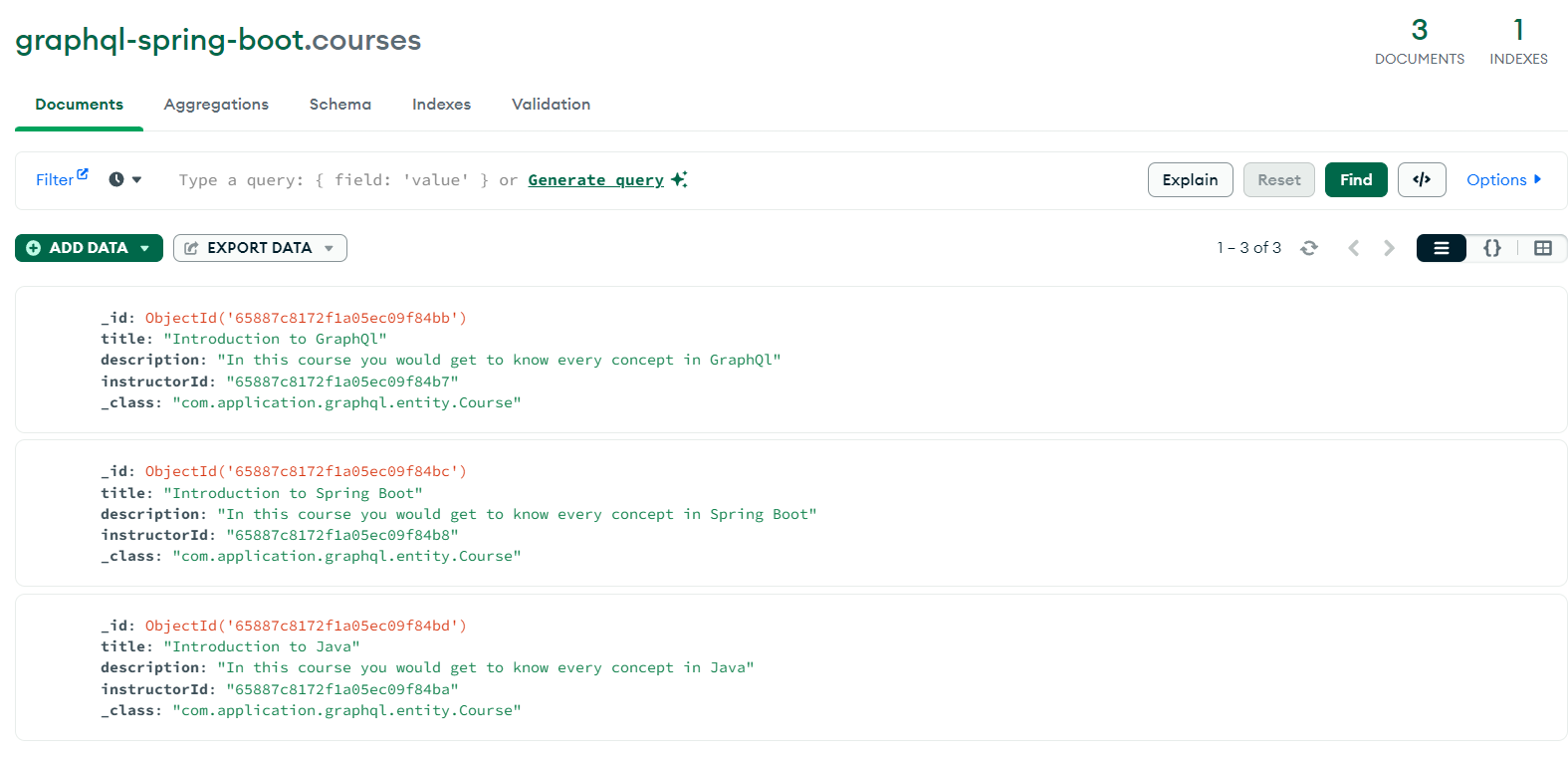
Once the application is started the details would be stored in the Database as shown below
User Collection
Course Collection
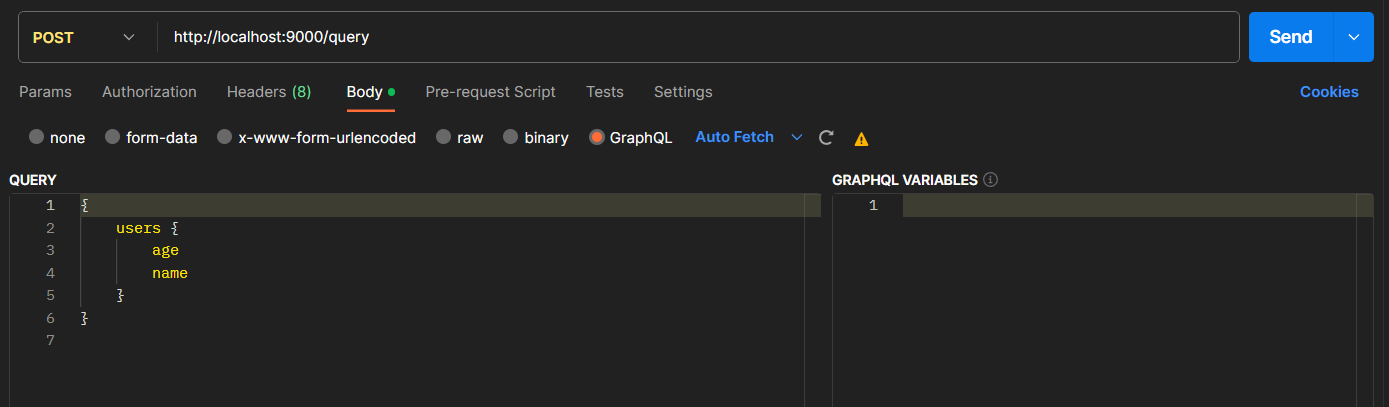
To get all users with their name and age by using the following payload in a POST request.
{
    users {
        age
        name
    }
}
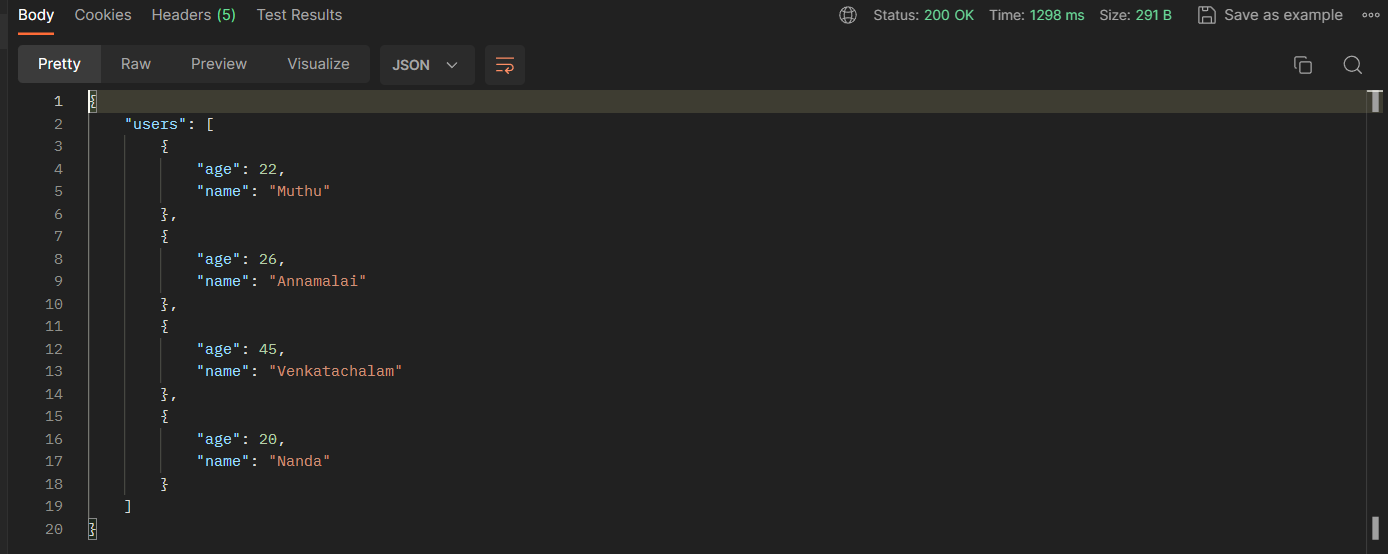
Query output:
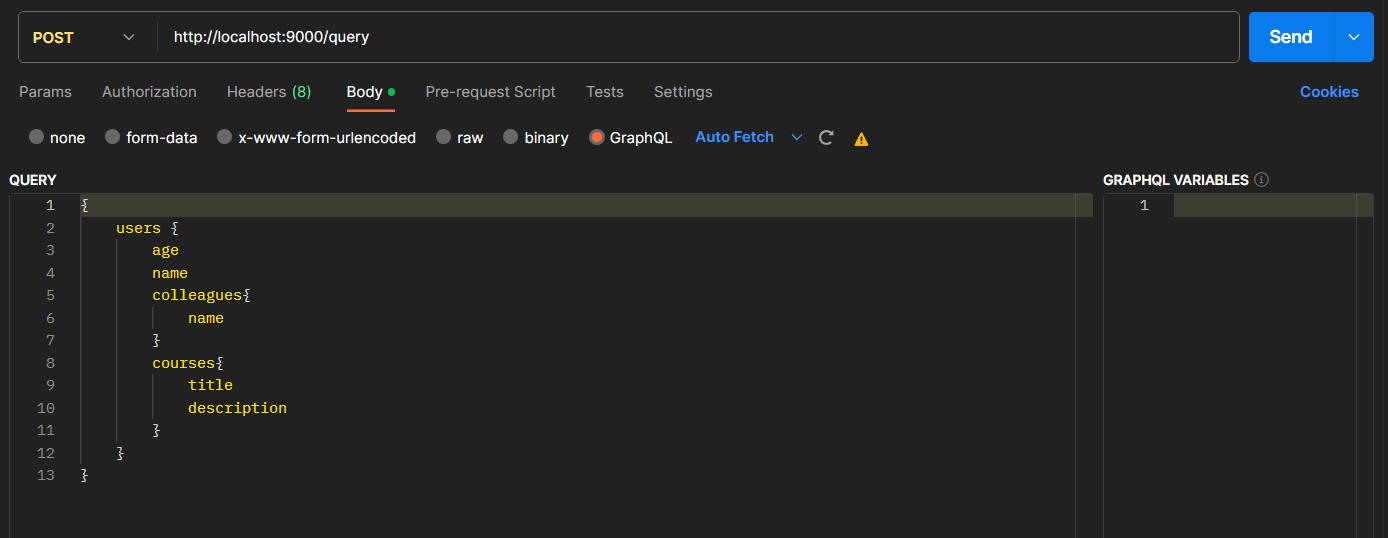
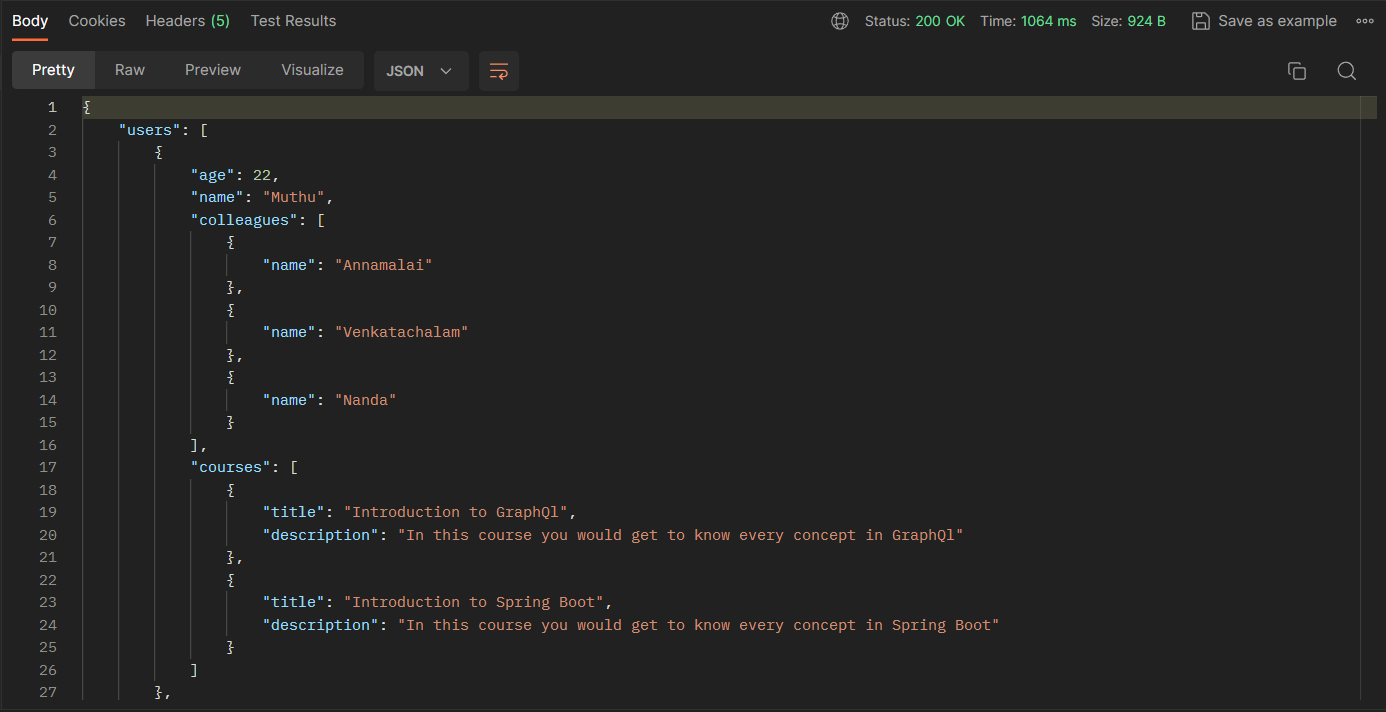
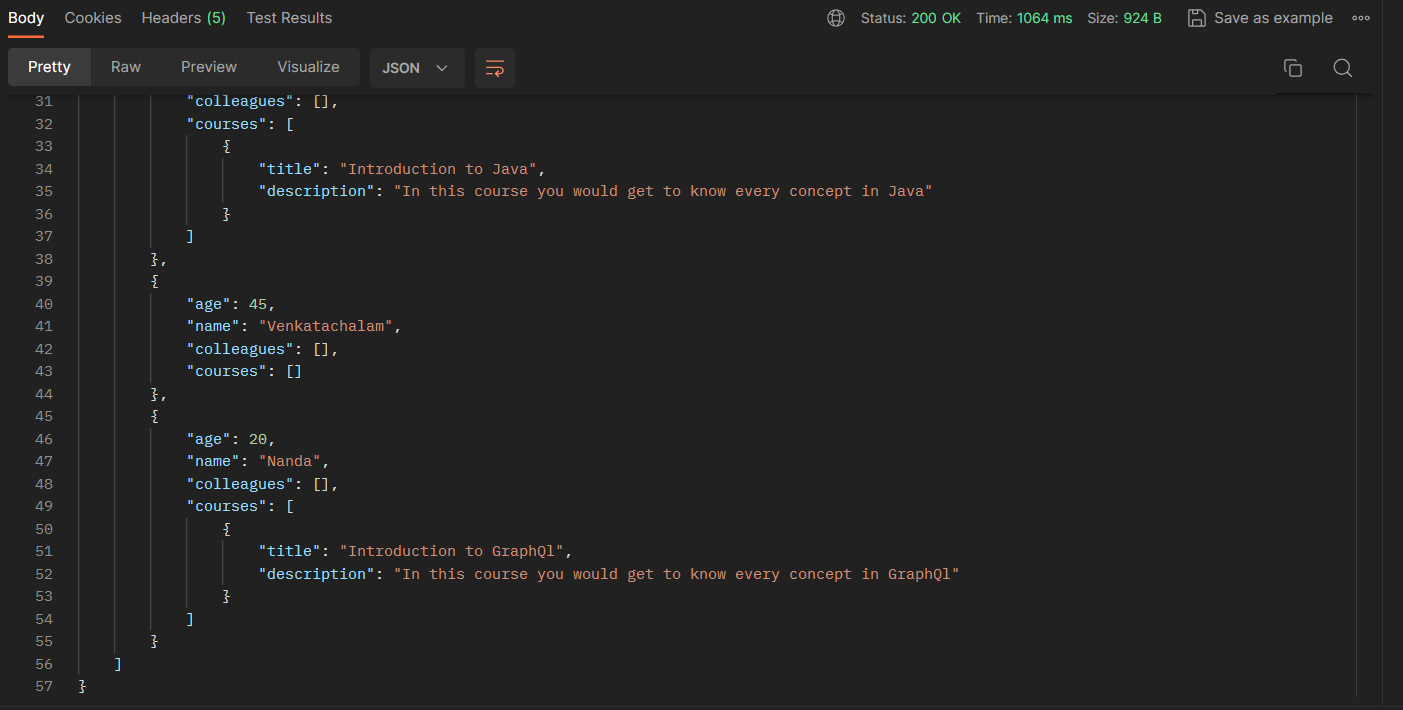
We will now try to get all users' age, name, colleague, and course information. Within the colleagues object, we would like to retrieve only the names of our colleagues. Within courses, there are titles and descriptions. Here is how the request will look:
{
    users {
        age
        name
        colleagues{
            name
        }

        courses{
            title
            description
        }
    }

}
Query output:
Conclusion
In this tutorial, we learned how to integrate GraphQL into a Spring Boot application using GraphQL concepts.